Email went down Thursday morning. For many offices, it still wasn’t fully back Friday.
Once Outlook is working again, there’s one more thing worth checking: whether your business qualifies for a service credit from Microsoft.
Microsoft’s commercial service level agreement, or SLA, promises a minimum uptime for its business services and sets a discount when it falls short. Microsoft doesn’t apply that discount on its own. An administrator or IT provider has to file a claim, and Microsoft decides whether to approve it.
It’s not a cash refund either, and it’s not a blanket payout for everyone who had trouble opening Outlook. What you could get depends on your subscription, which service failed and how many of your users were actually cut off.
What happened
Teams trouble came first. From 9:45 to 10:53 a.m. ET Thursday, Nov. 12, Teams had a separate problem in the Americas, which Microsoft tracked as TM1550488 and has since resolved.
The big one started at 11:17 a.m. ET (10:17 a.m. in Alberta). That’s when Microsoft opened incident EX1550543 for Exchange Online, the service behind business Outlook email. A wider incident, MO1550821, followed about two hours later. It added Teams, SharePoint and Copilot features that depend on Exchange.
Downdetector reports peaked above 131,000 across 74 countries and territories. We covered the first day in Microsoft 365 Outage: Outlook, Teams and Copilot Down for Hours.
The fallout reached well past office inboxes. The Associated Press reported that a Toronto hospital couldn’t send or receive email and told patients to call about appointments. Several U.K. police forces asked people to phone instead of using online forms. A Colorado sheriff’s office couldn’t receive emails about inmate bond payments.
In Alberta, the Calgary Board of Education’s system status page flagged problems with staff email, Teams, SharePoint and Copilot.
What Microsoft says went wrong
Microsoft hasn’t published a final cause. So far it says “a process on the affected servers responsible for establishing secure connections becomes overwhelmed,” which pushed servers out of service. When it brought servers back, some failed again as soon as traffic returned.
Overnight, Microsoft restarted infrastructure, rolled back recent network configuration changes and patched what it called an upstream authentication and routing component. It also throttled traffic in some areas so recovering servers wouldn’t be swamped.
Microsoft says it isn’t aware of any malicious activity.
Where things stand now
As of Friday morning, Microsoft is reporting recovery but hasn’t declared the outage over.
At 9:17 a.m. ET Friday, Microsoft said email queues were “significantly reduced and approaching normal levels.” It warned that some users “may still experience intermittent access issues.” It has reported broader improvements in North America and says the core functions of Teams and Copilot are working.
The CBE’s status page shows the same mixed picture. Staff email is marked as improving, with emails “now flowing normally,” while SharePoint is still listed as degraded.
That gap matters for a credit claim. One global incident played out differently from one organization to the next.
Who can claim
Organizations with a paid Microsoft 365 business, enterprise, education or government subscription.
Microsoft 365 Personal, Family and free Outlook.com accounts aren’t covered. If you were locked out of your home email, there’s no credit to claim.
How much the credit could be
For Exchange Online, Microsoft’s SLA uses these tiers. November has 30 days, or 43,200 minutes:
| Monthly uptime | Credit on the affected service | If every user was down |
|---|---|---|
| Below 99.9% | 25% | More than 43.2 minutes |
| Below 99% | 50% | More than 7 hours, 12 minutes |
| Below 95% | 100% | More than 36 hours |
The “44 minutes” figure going around online only holds if every user in your organization was down at once.
An example: one outage, three different results
Microsoft measures uptime in user minutes. It multiplies the minutes of downtime by the number of users affected, then compares that to all the user minutes in the month.
Take a 20-person office in Calgary. In November, those 20 users have 864,000 user minutes between them.
All 20 lose email for 12 hours. That’s 14,400 minutes of downtime and about 98.3 per cent uptime: the 50 per cent tier.
Five of the 20 lose email for 12 hours. That’s 3,600 minutes and about 99.6 per cent uptime: the 25 per cent tier.
Two people lose email for three hours. That’s 360 minutes and about 99.96 per cent uptime: no credit.
Same outage, three very different claims.
What counts as downtime, and what doesn’t
Email: For Exchange Online, downtime means users can’t send or receive email through Outlook on the web. If webmail worked while the desktop app froze, your case is weaker.
Slow isn’t the same as down. The SLA generally pays for services that are unavailable, not ones that are slow. Email that showed up hours late makes a weaker claim than a mailbox nobody could open.
Teams and SharePoint have their own definitions. For Teams, downtime means users can’t send messages or start meetings. Parts of Teams and SharePoint that don’t rely on Exchange kept working for many users, so email is usually the strongest claim.
The SLA excludes problems on your side of the connection, issues caused by third-party software, scheduled maintenance, and trial or preview services.
It’s a discount on one service, not your whole bill
Most Microsoft 365 plans bundle several services together. Microsoft’s partner guidance says the credit covers only the service that failed. Its own example is a suite customer whose SharePoint went down: the credit covers SharePoint, not the full plan.
So the real discount on a bundle is smaller than the percentage suggests. If your business had $100 in fees for the affected service and won 25 per cent, that’s $25. A business paying $100 for a whole bundle would get only a fraction of that.
Approved credits come off a future invoice. The SLA rules out cash refunds and any payment for lost sales, overtime or other costs.
How to file a claim
If you buy directly from Microsoft:
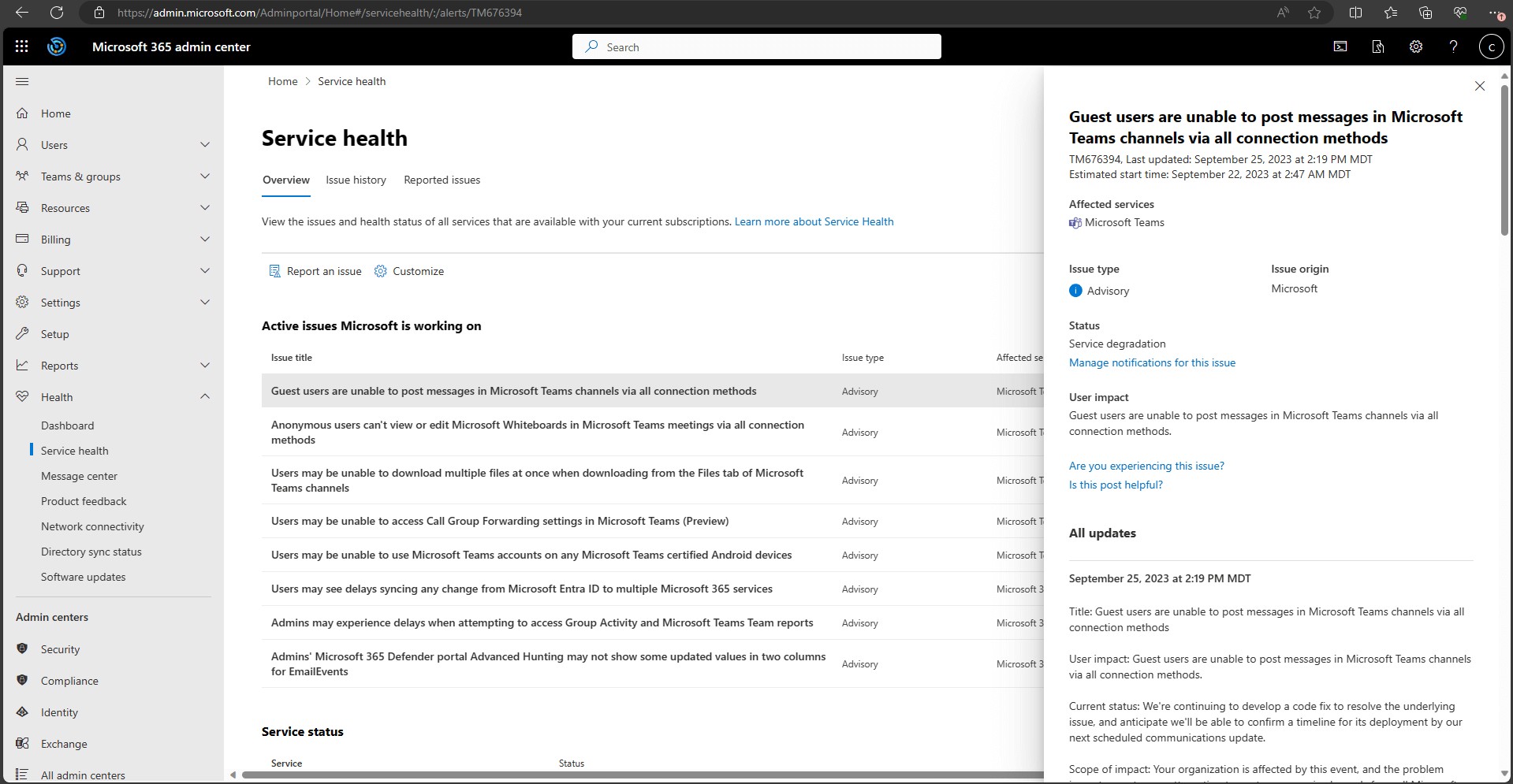
Open Service health in the Microsoft 365 admin center. For each incident that affected you (EX1550543, MO1550821 and, if Teams failed Thursday morning, TM1550488), note the start and end times and which features were hit.
Record your own timeline: when the problem started and ended for your users, how many were affected and where, and what errors they saw. Screenshots are enough.
Open a support request through Help & support in the admin center. Select Contact support and ask specifically for an SLA service credit.
Attach your timeline, user count and screenshots. Missing details are a common reason claims get turned down.
If you buy through an IT company or reseller (a CSP): you can’t file directly. Send the same information to your provider, along with your tenant ID and a request written from your company email domain. Microsoft won’t accept personal email addresses. Ask your provider about its own deadline, which may be earlier than Microsoft’s.
A message you can copy
Microsoft support works in English. Fill in the brackets with your own details:
Subject: SLA service credit request for EX1550543 / MO1550821 (and TM1550488)
We’re requesting an SLA service credit for the Microsoft 365 incidents of Nov. 12, 2026. Impact on our tenant began at [time, time zone] and ended at [time]. [Number] users in [location] could not send or receive email through [Outlook on the web / the Outlook desktop app]. Attached are our Service health incident details, error screenshots and the list of affected users.
The deadline is Dec. 31
For Microsoft 365 services, claims are due by the end of the month after the month of the outage. A Nov. 12 outage means Dec. 31, 2026.
Leaving an ordinary tech support ticket open doesn’t count as a credit claim. You have to ask for the credit specifically.
Is it worth filing?
For a small office, the credit might be a few dollars a user. For an organization with hundreds or thousands of seats, it can add up.
Either way, it takes about 15 minutes if you’ve kept good notes, and it puts on record what the outage cost you. Nothing is guaranteed: Microsoft hasn’t announced any credits for this outage and will judge each claim on its own.
Watch for scams
Microsoft won’t contact you to hand out a credit. Claims start with you. Treat any unexpected email, text or call offering an “outage refund” as phishing, especially if it asks you to click a link or enter a password.
Frequently asked questions
Does Microsoft apply the credit automatically?
No. Your organization has to request it with supporting details.
Can I claim for my personal Microsoft 365 or Outlook.com account?
No. The SLA only covers business, education and government subscriptions.
Is the credit a percentage of my whole bill?
No. It’s a percentage of the fees for the service that went down.
Can I claim for Copilot?
Microsoft listed Copilot among the services hit. We couldn’t find a separate uptime commitment for it in the SLA. Focus your claim on Exchange Online, Teams and SharePoint.
Can I get compensation for lost business?
No. The SLA says the service credit is the only remedy for outages. Businesses with bigger losses should check their own contracts or get legal advice.
When will I hear back?
Approved credits show up on a future invoice. If you go through a provider, ask them to track the claim.
Microsoft usually publishes a post-incident review after major outages. Admins can find it under Service health. We’ll update this story when service is fully restored.
Sources
Microsoft Learn: How and when to request a credit from Microsoft
Microsoft 365 Status (@MSFT365Status) on X, Nov. 12–13, 2026








Comments